Free template
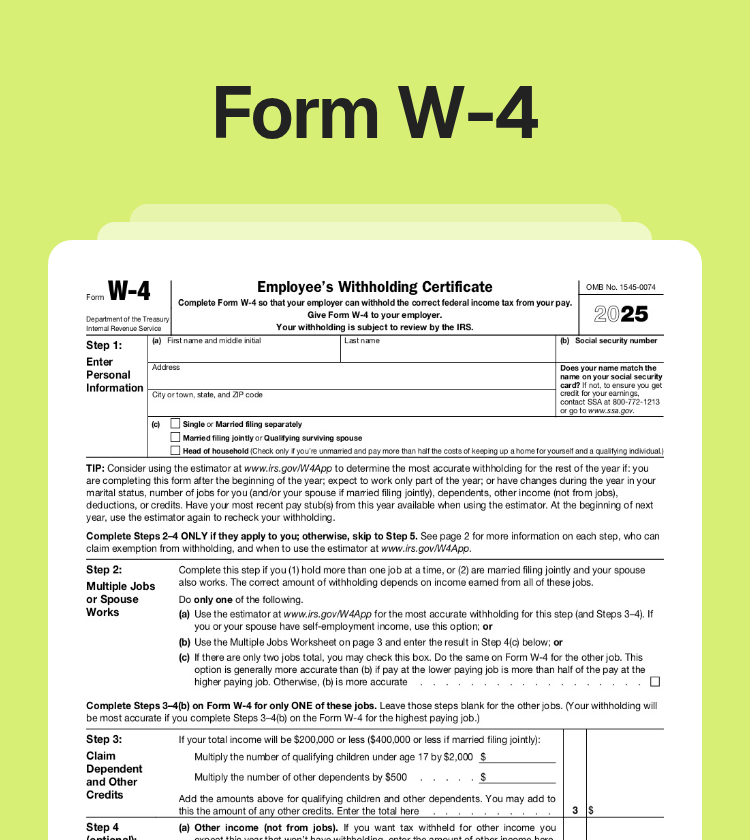
Free IRS Form W4
Template Types
What Is a W-4 Form?
Copy section linkForm W-4 (also known as the Employee's Withholding Certificate) is a federal IRS form you fill out for your employer when you start a new job or your personal or financial situation changes. The key purpose of this document is to let the employer know how much federal income tax to withhold from each paycheck. The more they withhold, the smaller your paychecks are and the bigger refund you get.
You need to give your employer a completed W-4 Form as soon as you start a new position. If nothing changes while you work, you don't need to renew it. However, you have to update it every time any of these changes in your life happen:
You get another job or side income;
You get married or divorced;
You have or adopt a kid;
You gain or lose a dependent;
You inherit or buy property;
You have significant changes in your tax deductions.
If the significant change in your life is to decrease your withholding, it is recommended to submit an updated W4 Form 2026 within the 10-day period. Otherwise, you can do it anytime during the year.
If you and your spouse have combined household income and file taxes jointly, any changes in your spouse’s financial situation – a new job, a raise, or a lost job – are also a reason to update your W4 Form.
What You Need to Know Before You Use the W-4 Form
Copy section linkHere are a few things you should know before you start filling out the W-4 Form template:
If you do not submit Form W-4, your employer will withhold taxes as if you’re single with no other adjustments.
You do not submit this form to the IRS; you only provide it to your employer. However, the IRS may request the form from employers for review.
Nonresidents must review Notice 1392 and check special instructions before completing the W-4 Form.
The IRS typically updates the printable W4 Form every year. Make sure you use the latest version – check the year in the top right-hand corner of the sample W4 Form.
How to Fill Out a W-4 Form Template?
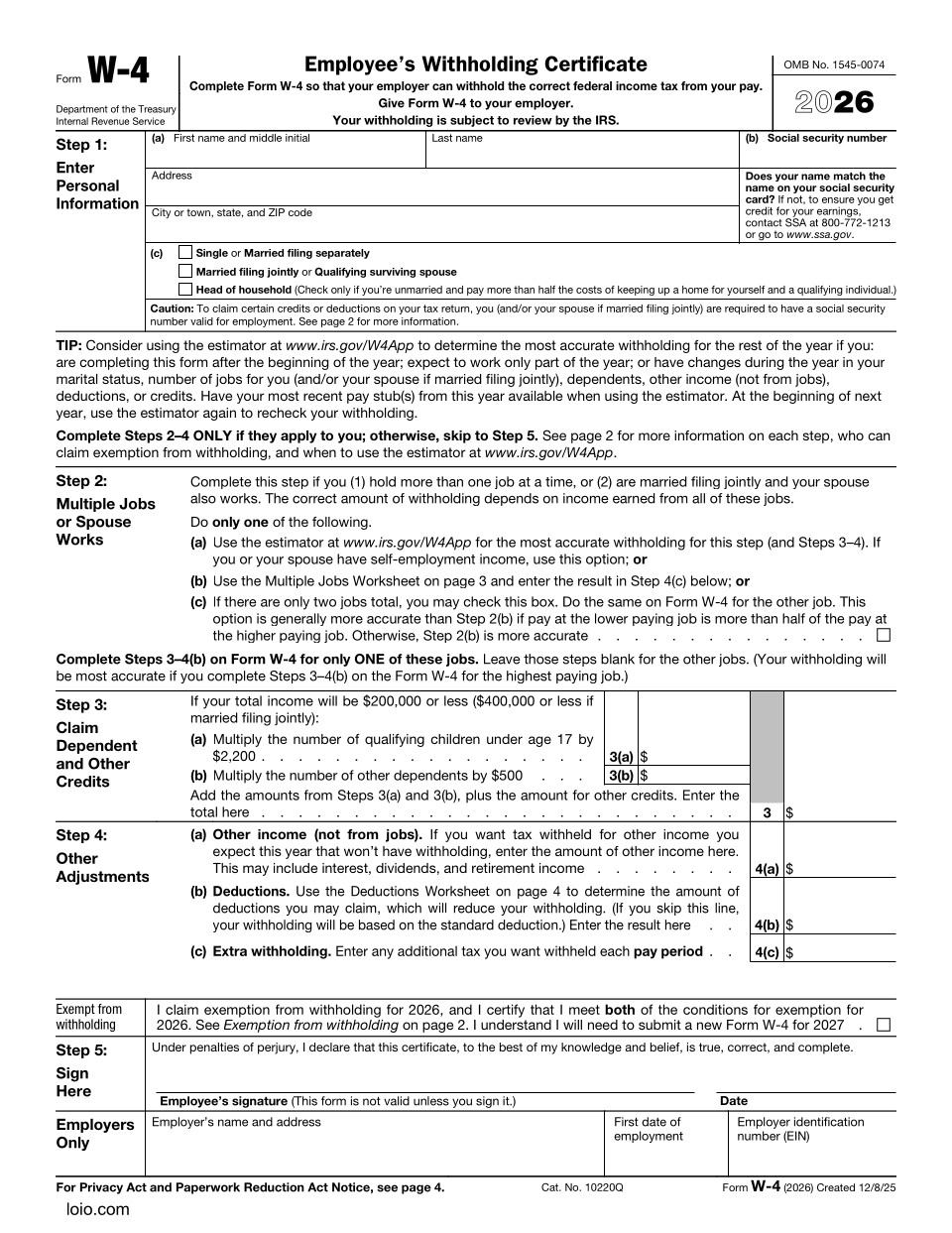
Copy section linkMost people only need to fill in Steps 1 and 5. Complete Steps 2-4 only if they apply to your situation.
Step 1: Provide personal details
In the section titled “Enter Personal Information,” write your full name, address, and Social Security number (SSN). The name you write must match the one on your SSN card.
Then, select one of three tax filing statuses:
“Single” or “Married filing separately” if you file taxes only for yourself.
“Married filing jointly” if you file taxes together with your spouse, or “Qualifying surviving spouse” if you file taxes jointly with the spouse who passed away in the last two years and you have a dependent child.
“Head of household” if you are unmarried, cover more than half the cost of keeping a home, and have a dependent person who lives with you for more than half a year (a dependent parent can live separately).
Step 2: Multiple jobs or spouse works
Fill out the section “Multiple jobs or spouse works” in the W4 Form 2026 only if you have more than one job or are married and file taxes jointly with a working spouse.
Choose one of these options:
Use the IRS Tax Withholding Estimator to make all the calculations;
Complete the Multiple Jobs Worksheet on page 3 to make the calculations manually and write the result in Step 4(c).
Check box 2(c) on the 2026 W-4 Forms for both jobs (this option applies only if you have two jobs total in your household and the smaller paycheck is at least half the size of the bigger one). This option is the least accurate, but it’s the easiest of the three to complete.
Step 3: Define your dependents
Fill out the “Claim Dependent and Other Credits” section only if it applies to your situation. If you have multiple jobs, complete Steps 3–4(b) on only one Form W-4 (preferably the one where you have the highest salary) and leave those steps blank on all other W-4 Forms.
If you have dependents or credits, and your total income is $200,000 or less ($400,000 or less if you’re married and file taxes jointly with your spouse), you can reduce your tax withholding. For this, you need to do the following calculations:
a) For children under 17 years old: number of children x $2,200.
b) For other dependents: number of dependents x $500.
c) For tax credits: Total sum for 3(a) + total sum for 3(b) + estimates for other tax credits. Write the total sum on line 3.
Completing Step 3 increases the pay you receive. If you leave it blank, you can have higher tax withholding, which some taxpayers prefer if they want to avoid owing tax on side income.
Step 4: Calculate additional deductions
By completing the “Other Adjustments” section, you can keep money in your pocket now instead of waiting for a tax refund later. Only fill it out if one of the situations below applies to you.
4(a): Fill this out if you earn money that does not come from a job and no taxes are taken out of it. It can be Interest from a savings account or dividends from investments. Enter the total amount of the extra income you expect to earn this year.
4(b): The government allows everyone to subtract a certain amount from their income before they calculate taxes. This is called a standard deduction and has the following thresholds:
“Single” or “Married filing separately” – $16,100;
“Head of household” – $24,150;
“Married filing jointly” – $32,200.
If your deductions do not exceed these amounts, skip 4(b) entirely.
However, you can subtract more than the standard deduction. It usually applies if you have tips, overtime pay, a student loan, or make large charitable donations. In this case, you need to check the Deductions Worksheet on page 4 of the W-4 tax form and calculate the deductions that are above the standard. Write the sum in the 4(b) box.
4(c): Fill this section out if you want your employer to take out additional tax money from each paycheck. You may do it to avoid owing money at tax time or create an extra sum withheld to avoid big tax bills. To complete it, write the extra dollar amount you want to be withheld from your paycheck.
If you do not want to reveal your extra income to your employer in Step 4(a), you can calculate the tax yourself and enter an extra withholding amount per pay period in Step 4(c) instead. Or, you can pay additional taxes directly using Form 1040-ES.
In 2026, you can claim a full exemption from federal income tax withholding only if you meet both of these conditions:
- You had no federal income tax liability in 2025.
- You expect to have no federal income tax liability in 2026.
If both statements are true about you, put a tick under Step 4, complete Steps 1(a), 1(b), and 5. Leave Steps 2–4 blank.
Claiming an exempt status you do not qualify for can lead to huge penalties. Exempt status expires annually, and you must submit a new Form W4 by February 16, 2027, to maintain it.
Step 5: Sign and date the form
Add your electronic signature and the date you complete the document. Unsigned W-4 Forms are invalid.
Do not fill out the “Employer only” section!
Requirements for this document vary by state. Review your state's laws and procedures — or consult a licensed attorney — before using this template to ensure it's valid and enforceable where you live.