Free template
Free Payment Application Template
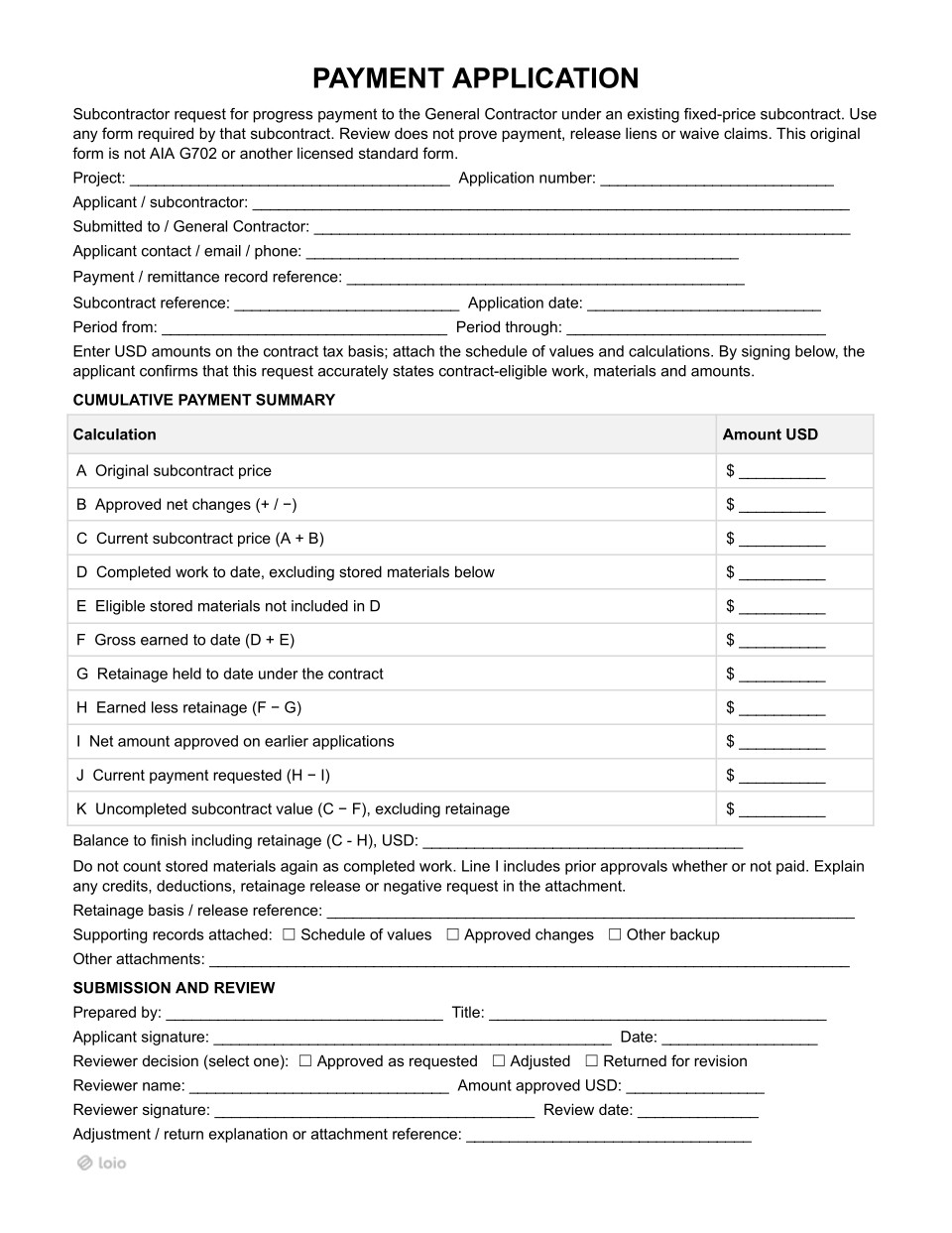
A payment application template is a form a subcontractor uses to ask the general contractor for a progress payment under a fixed-price subcontract. It shows how much of the subcontract price you have earned so far, how much is held back as retainage, and how much is due for this billing period.
The general contractor's reviewer checks the form line by line. The schedule of values, the summary, the approved changes, and the retainage must all show the same figures, and each figure must trace back to the subcontract.
Most subcontractors reach for this form at the end of a billing period, when the work is in place, the materials are on site, and the general contractor's cutoff is a few days away. An application gets approved without cuts when the reviewer can follow each number back to its source, and that starts with the records you pull together before the first figure goes in.
Invoice or Payment Application: Which One Does Your Billing Need?
Copy section linkThe two documents ask for money in different ways. An invoice bills a delivered item or a fixed amount. A payment application(often shortened to pay app) bills progress against a fixed subcontract price.
A pay app is also cumulative. Each one lists everything you have earned since the job began, takes off retainage, and subtracts the amounts approved on earlier applications. What remains is line J – Current payment requested (H − I).
| Invoice | Payment application | |
|---|---|---|
| What it bills | A delivered item or a fixed amount | Progress on a fixed subcontract price |
| How the amount is built | One figure for this delivery | Earned to date, less retainage, less earlier approvals |
| What the reviewer checks | That the item arrived and the price is right | Every line against the schedule of values and the subcontract |
A framing crew finishes two floors of a five-floor building this month. An invoice that says "framing, two floors" gives the general contractor nothing to check it against.
Outcome: on a pay app, the same work appears as an amount on the framing line of the schedule of values, and the reviewer can compare it with what stands on site.
Check which form your subcontract asks for
Many subcontractors assume any progress billing format will do. Where your subcontract names a format, send that one. This is when our template fits:
| Situation | Does the template fit? | What to do |
|---|---|---|
| A fixed-price subcontract paid in progress payments, with or without retainage | Yes | Fill in the application for each billing period |
| The general contractor also asks for lien waivers, certified payroll, or insurance certificates | Yes, with additions | Send them as separate documents and list them under Other attachments |
| Time-and-materials or cost-plus work | No | Bill by hours and costs, since that work has no schedule of values |
| You work directly for the owner on an AIA contract | No | The owner expects AIA G702 and G703, and this form is not a licensed AIA document |
What to Gather Before You Enter the First Number
Copy section linkThe form is filled in from four sets of records, and all of them already exist by the time the billing period closes. Having them in front of you keeps every figure tied to a source the reviewer can open.
| Record | What you take from it | Where it goes on the form |
|---|---|---|
| The subcontract's payment clause | Submission date, required attachments, retainage rate and release terms, how changes are approved | Subcontract reference, the retainage rate, the attachments list |
| The schedule of values agreed at the start of the job | The work items and the value of each | The rows of Work and materials |
| The log of approved changes | Each approved addition or deduction, with its approval | Approved changes and line B |
| Earlier applications as approved | The amount the reviewer approved each time | Line I |
The date that decides when you get paid
On most jobs, the general contractor bills the owner on its own periodic application, and the subcontractor’s numbers go into it. If an application arrives after the general contractor's cutoff, or comes back for revision, the subcontractor can miss that cycle and wait a full billing period.
The subcontractor should check the submission date in the subcontract and treat it as their deadline. The end of the billing period only shows which work to count.
Bill against the values you agreed
Your schedule of values usually comes with the subcontract as an exhibit. Each of its items takes a row of its own in Work and materials, the first table on page two of the form, with the same item number, description, and scheduled value. You bill against those agreed values each month and do not replace them with new ones.
The scheduled values must add up to line C Current subcontract price. When a change is approved, its value joins the schedule, so the total keeps matching line C.
Approved is not the same as paid
The line “I Net amount approved on earlier applications” counts every earlier approval, whether or not the money has reached the subcontractor. If the general contractor leaves some approved amount unpaid, it still counts on line I.
A late payment on an approved application is a separate matter. You follow it up under the subcontract's payment terms, and the new application stays clean.
How to Fill In Work, Stored Materials, and Changes
Copy section linkThe second page of the form, the continuation sheet, is where the numbers start. Each row of Work and materials adds Prior work, This period, and Stored now into Total earned.
The column Totals then carry to the summary on page one. Completed work goes to line D, stored materials to line E, and total earned to line F. The form works as one chain, so a change in any row changes the summary.
An electrical subcontractor has a $100,000 subcontract and one approved change of $5,000. In the second month, the crew does more rough-in wiring, and a panel is delivered to the site but not yet installed.
| Description | Scheduled value | Prior work | This period | Stored now | Total earned |
|---|---|---|---|---|---|
| Rough-in wiring | $50,000 | $30,000 | $10,000 | $0 | $40,000 |
| Panels and gear | $30,000 | $0 | $0 | $5,000 | $5,000 |
| Fixtures and trim | $20,000 | $0 | $0 | $0 | $0 |
| Change 01, added circuits | $5,000 | $0 | $0 | $0 | $0 |
| TOTAL | $105,000 | $30,000 | $10,000 | $5,000 | $45,000 |
The totals carry over as $40,000 on line D, $5,000 on line E, and $45,000 on line F. The scheduled values add up to $105,000, the same figure as line C.
Stored materials are paid only on the subcontract's terms
Materials the subcontractor bought but has not installed go under Stored now, and only when the subcontract allows payment for them. Before you bill stored materials, check which proof the subcontract asks for, such as supplier invoices, the storage location, or insurance.
Materials stored off-site face a stricter rule on many jobs. Contracts built on AIA A201 pay for them only with the owner's advance approval and at a location agreed in writing. Your subcontract may pass that condition down to you, so read how it handles storage.
Once the materials are installed, they move out of Stored now into completed work. In the example, the $5,000 panel leaves the stored column next month and appears under This period, so it is never counted twice.
Only approved changes go on the form
A common assumption is that an extra becomes billable once the general contractor says to go ahead. On this form, line B Approved net changes and the scheduled values take approved changes only.
A pending change stays out until you can fill in its Approval/date reference, for example, the number and date of the signed change order. Keep pending extras in your own log and add them to the first application after the approval arrives.
Percent complete comes from the numbers
% complete is total earned divided by scheduled value, multiplied by 100. In the example above, rough-in wiring stands at 80% because $40,000 of its $50,000 has been earned. Lines with a zero value get N/A.
The figure is a calculation and should not be a guess about how far along the schedule feels. Overstating it brings money forward, but it also shrinks the balance left to pay for the hardest part of the work.
Retainage: How Much Is Held Back and When It Comes Back
Copy section linkRetainage is the share of the subcontractor’s earned money that the general contractor holds until the work is finished properly. Retention means the same thing, and California statutes use that word.
Line G Retainage held to date under the contract comes from the Retainage calculation table on page three. The table applies the subcontract's rate to completed work and to stored materials on separate rows, because some subcontracts treat the two differently.
| Basis | Eligible USD | Rate | Retainage USD |
|---|---|---|---|
| Completed work | $40,000 | 10% | $4,000 |
| Stored materials | $5,000 | 10% | $500 |
| Authorized adjustments/releases | $0 | ||
| TOTAL after adjustments | $4,500 |
In the example, the subcontract sets 10% on both, and $4,500 goes to line G. The retainage column of the continuation sheet has to reach the same total.
State law can override the rate in your subcontract
In some states, the law caps retainage below the rate written in the subcontract. Check the rate before you carry it to line G.
| State | The cap | Where it applies | Law |
|---|---|---|---|
| California | 5% of each payment and 5% of the contract price. A subcontractor's rate also cannot be higher than the rate in the prime contract. | Private works contracts signed on or after January 1, 2026. Residential projects of four stories or less that are not mixed-use are excluded. | Cal. Civ. Code § 8811 |
| New York | 5% of the contract sum | Private construction contracts of $150,000 or more | N.Y. Gen. Bus. Law § 756-c |
Other states have their own rules. If the rate in your subcontract looks too high for the job, ask the general contractor which rate the prime contract sets and whether a state cap applies.
Getting retainage back
Retainage comes back only on an authorization, such as a milestone, substantial completion, or a written release. A release goes in the adjustments row as a negative amount, which lowers line G and raises the payment you request.
Two fields name the authorization. Retainage basis/release reference sits on page one, and Adjustment/release authorization reference sits under the retainage table. With both filled in, the reviewer can match the release to the document behind it.
Two balances that are easy to mix up
Line K Uncompleted subcontract value leaves retainage out. It shows the part of the subcontract price not yet earned. Balance to finish, including retainage, adds back the retainage the subcontractor is still waiting for.
Let’s consider an example:
| Line | Calculation | Amount |
|---|---|---|
| A | Original subcontract price | $100,000 |
| B | Approved net changes | $5,000 |
| C | Current subcontract price (A + B) | $105,000 |
| D | Completed work to date | $40,000 |
| E | Eligible stored materials | $5,000 |
| F | Gross earned to date (D + E) | $45,000 |
| G | Retainage held to date | $4,500 |
| H | Earned less retainage (F − G) | $40,500 |
| I | Net amount approved on earlier applications | $27,000 |
| J | Current payment requested (H − I) | $13,500 |
| K | Uncompleted subcontract value (C − F) | $60,000 |
| Balance to finish including retainage (C − H) | $64,500 |
The two balances differ by $4,500, which is exactly the retainage on line G.
Signing, Review, and What an Approval Means
Copy section linkThe subcontractor’s signature as the applicant confirms that the request accurately states contract-eligible work, materials, and amounts. Sign after the totals on all three pages agree, since a general contractor can reject the application if they find any mismatch in it.
Once the reviewer receives the application, they make one of three decisions.
| Reviewer decision | What it means | What you do next |
|---|---|---|
| Approved as requested | The amount on line J is approved in full | Use that amount in line I next month |
| Adjusted | The reviewer approved a different figure, shown in Amount approved USD | Use the approved figure in line I next month |
| Returned for revision | Nothing is approved yet | Correct the application and resubmit before the cutoff |
When the reviewer approves a lower number
The approved figure becomes the basis for line I on the next application. The reason for the cut appears in the Adjustment/return explanation or attachment reference.
If the subcontractor disagrees, the dispute should be resolved through the process set by the subcontract. Carrying your original numbers into the next application would only bill the difference again, and the reviewer would cut it again.
Approval is not payment, and it is not a lien release
The form clearly states that review does not prove payment, release liens, or waive claims. The lien waiver the subcontractor sends with each application should match where the money is.
For example, California law shows the difference clearly.
| Waiver on a progress payment | What it says | When to sign it | Law |
|---|---|---|---|
| Conditional | The release takes effect only when the payment arrives | With the application | Cal. Civ. Code § 8132 |
| Unconditional | The payment has already been received | After the money clears | Cal. Civ. Code § 8134 |
Waivers are separate documents. List them under Other attachments when the general contractor asks for one with each application.
When the money arrives
Timing after approval follows the subcontract and state law. In California, for example, the prime contractor must pay the subcontractor within seven days after receiving each progress payment, unless the two agreed otherwise in writing (Cal. Bus. & Prof. Code § 7108.5).
That clock starts when the owner pays the general contractor. An approval alone does not start it, which is one more reason to meet the submission date in the first place.
How to Send, Adjust, and File Payment Applications in Loio
Copy section linkLoio keeps the entire pay app cycle in one document, so you can fill it out, sign it, send it, and settle any adjustment with the reviewer without resending files.
Review the subcontract with Loio Summary. Before the first application, run the subcontract through Loio’s AI contract review. It summarizes the document and puts the submission date, retainage rate, release conditions, and required attachments in front of you.
Fill in the application. Open the payment application template and enter the figures for the period.
Sign and send for signature. Add your signature and email the payment application to the general contractor’s reviewer. If the reviewer suggests any corrections, you can easily make them using PDF Editor.
Save and reuse the template. Each signed application is saved in your account with a time-stamped audit trail so that you can trace every month’s line I back to a signed approval. For a job billed monthly, reuse the filled-out payment application template so each application goes to the same reviewer in the same signing order.
What should a payment application include?
A payment application should include the project and subcontract details, the billing period, and a cumulative summary that runs from the original subcontract price to the payment requested. To complete the summary, the subcontractor should also fill out the schedule of values, the list of approved changes, and the retainage calculation. The applicant signs the payment application, and the reviewer records a decision and the amount approved.
What is a continuation sheet (schedule of values) in a payment application?
The continuation sheet lists every work item in the subcontract with its scheduled value. For each item it shows prior work, work done this period, materials stored now, and total earned. Its totals are recorded in the summary on the first page, which is why the reviewer usually starts there.
Is a payment application form the same as AIA G702?
No, AIA G702 is a licensed form a contractor uses to bill the owner, with the architect certifying the amount. This payment application is an original form for a subcontractor billing the general contractor, where the general contractor’s reviewer approves the request. If your subcontract requires the AIA documents, use those instead.
Can I use a pay application template when my subcontract has no retainage?
Yes, you can. Enter a rate of zero in the retainage table, and line G stays at $0. Earned less retainage then equals gross earned, and the rest of the form works the same way.
How often is a construction payment application submitted?
You fill in the construction payment application template once for each billing period your subcontract sets and send it by the submission date it names. Each new application is cumulative, so it repeats the totals to date and subtracts what was approved before.