Free template
Free Project Acceptance (Sign-Off) Form
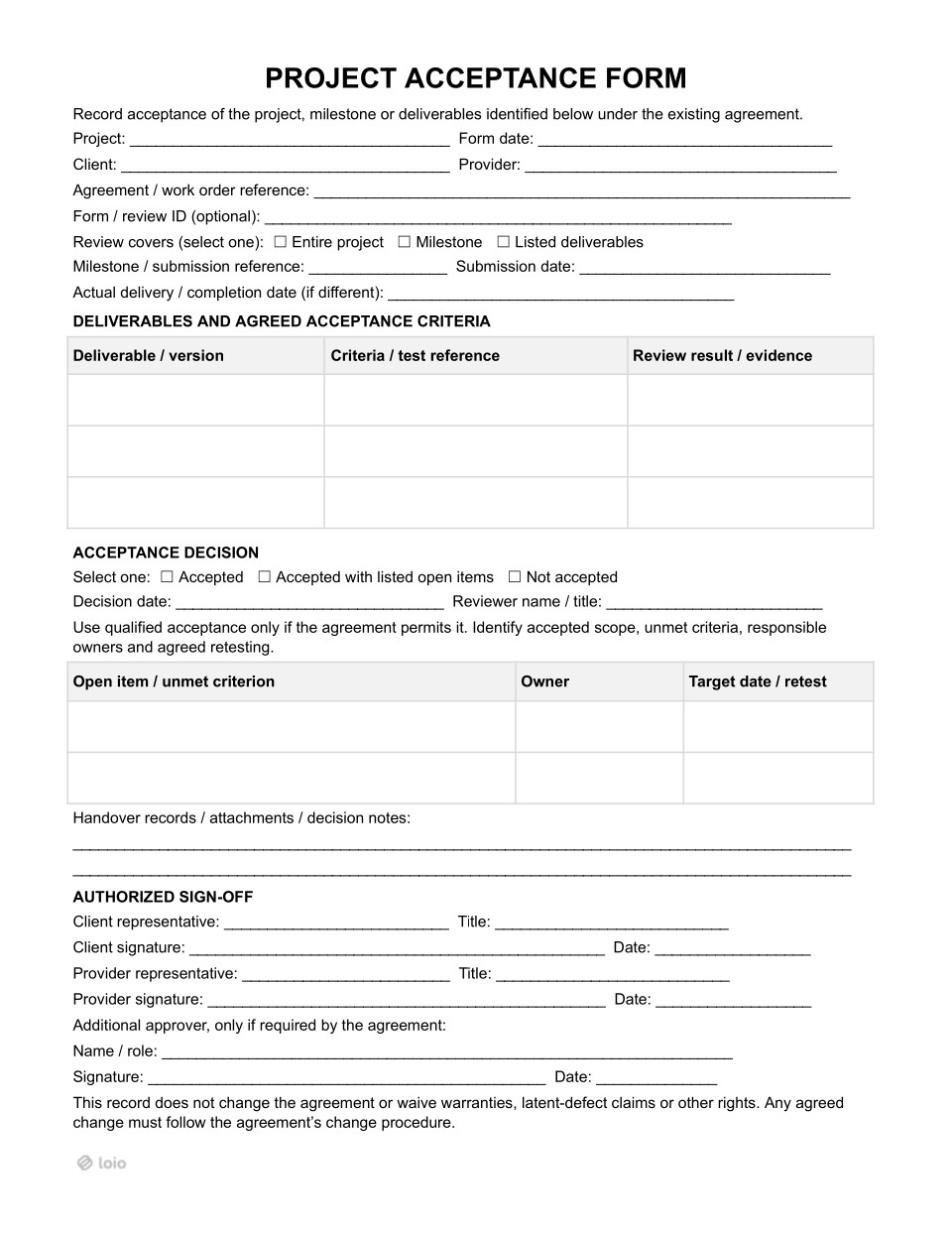
You finish a project. After the client reviews it, you have a quick call, and they tell you the end result looks great. Two weeks later, you send the final invoice — and that’s when the client replies that some things need fixing, and so the invoice isn’t due until the project is accepted. Nobody wrote down what “looks great” actually covered, and it remains unclear what the customer actually meant.
A project sign-off template is a form the client signs to accept work delivered under an existing agreement. It can cover the whole project, one milestone, or a set of deliverables. The form shows what the client checked, whether the work met the agreed requirements, and the date of the decision. If the agreement ties payment and the warranty to acceptance, the provider can send the invoice and start the warranty period from that date. The client accepts only the work that meets the requirements and lists anything that still needs fixing, so they can still ask the provider to fix it.
Is a Formal Acceptance Record Right for You?
Copy section linkA verbal agreement might seem like a good enough acceptance for a project. But a brief interaction that no one put in writing doesn’t answer several key questions:
What exactly was accepted?
Which version?
On what date?
With which known issues?
A project sign-off template answers all four on one page. When the agreement says the final payment or the next phase starts after acceptance, it means starting after this document is signed.
The form clarifies what a client is reviewing: the entire project, one milestone, or a list of deliverables. The choice depends on how the agreement sets up payment. If the client pays in stages, the provider prepares a separate form for each stage, so each payment is linked to its own acceptance. If the client pays once for the whole project, one form at the end covers everything and serves as a project completion sign-off form.
A design agency rebrands a chain of coffee shops. The agreement splits the fee into three payments: logo and brand guide (30%), website design (40%), and printed menus and signage (30%). The agency asks for a separate acceptance form after each stage, and each form names its milestone, such as “Milestone 2: website design.”
Outcome: Each payment is tied to its own signed decision. When the client asks for more menu changes, the money for the logo and the website isn’t held up.
Most service and project work fits this project sign-off form. A few areas need an extra document or follow their own process.
| Fits | Fits with additions | Different solution | ||
|---|---|---|---|---|
| Type of work | Project under an agreement or work order with agreed deliverables: software, design, consulting, implementation, installation | Construction | Sale of goods | Federal government contracts |
| What else is needed | Nothing extra. The form is the main record of the client’s decision. | Substantial completion is certified on the contract’s own document (AIA G704 for AIA contracts). Progress payments go through payment applications. | A prompt inspection. Goods count as accepted if the buyer doesn’t reject them in time (UCC § 2-606). | The contract’s own acceptance process. Acceptance belongs to the contracting officer (FAR 46.502), not the program contact. |
What Should Be Settled Before the Client Reviews the Work?
Copy section linkMany acceptance arguments start because the two sides have different ideas of what “done” means. The agreement’s acceptance document settles this in advance. Before the review, it’s worth finding the answers to four questions:
Who on the client’s side can accept the work?
How many days does the client have to review it?
What counts as a rejection?
Does the work count as accepted if the client says nothing by the deadline?
The project acceptance clause refers to this agreement or work order by name or number, so both sides know which rules apply to the review.
Criteria do not change at the review
The client checks the work against the criteria both sides agreed on before the work started. Each criterion listed in the form refers to a written source, such as a section of the statement of work, a test case, or a specification. If the client asks for something new during the review, that request is a change to the agreed work. The provider handles it under the agreement’s change procedure, with its own price and deadline, and the client can’t reject the work because of it.
Additionally, each version of the project is reviewed individually. If the client tested version 2.3 and the studio then delivers 2.4 with a fix, the acceptance of 2.3 doesn’t cover 2.4. The project completion sign-off form names the exact version that was reviewed.
The SOW for a company website says pages must load in under 3 seconds and the contact form must send messages to the sales inbox. At the review, the client asks for a dark mode. Dark mode was never in the SOW, so it becomes a change request with its own price and timeline, while the site is judged on load speed and the contact form.
Silence can count as acceptance
Many agreements say that work the client doesn’t reject within the review period is treated as accepted. This is called deemed acceptance. The review period usually starts on the submission date, so that date should be exact. If the work was actually finished on a different day, the form records that too.
Both sides benefit from a clear date: the provider can show that the review period has run out, while the client knows their last day to object.
A studio submits a finished website on Tuesday, June 2. The agreement gives the client 10 business days to review and includes deemed acceptance.
Outcome: If the client doesn’t reject the site in writing by Tuesday, June 16, the site counts as accepted, and the final invoice can go out.
Accepted, Accepted With Open Items, or Not Accepted
Copy section linkA project acceptance form usually offers three decisions. Each one leads to a different next step:
| Decision | When it fits | What to write down | What happens next |
|---|---|---|---|
| Accepted | All agreed criteria are met | The deliverables, their versions, and the test results | Payment and warranty terms start from the decision date, where the agreement ties them to acceptance |
| Accepted with open items | Most criteria are met, a few minor ones fail, and the agreement allows this option | What is accepted, each open item, who fixes it, and the retest date | The accepted part moves on; the open items get fixed and retested |
| Not accepted | Important criteria are not met | Each failed criterion and the proof | The provider fixes the work and submits it again for a new review |
When “Accepted with open items” is suitable
The client can choose this status only if the agreement allows partial acceptance. A project sign-off template usually reminds both sides of this rule. When the agreement allows it, this status fits when:
Most of the work meets the agreed criteria;
The failed items are minor and don’t stop the client from using the accepted part;
Each failed item can be fixed and retested on its own;
Both sides agree on who fixes each item and by what date.
If a failed item makes the whole deliverable unusable, this status doesn’t fit, and the client marks the work as not accepted.
A web studio builds an online store for a client. The store passes every agreed test for the catalog, checkout, and payments, but two functions fail: the order export and the returns export. The client chooses “accepted with open items.” They list both exports as open items, name the studio’s backend developer as the person responsible for fixing them, and set a retest date of July 10.
Outcome: The store goes live. The studio sends an invoice for the accepted part, as far as the agreement allows partial payment. The two exports are retested on July 10.
When the work is not accepted
A work rejection requires details: it names the unmet criterion and points to the proof in the review results. It should be concrete so that the provider knows what to fix. A vague rejection, like “not what we expected,” invites a dispute. The provider uses the same evidence column for their side of the story. Test results, screenshots, or a recording of a demo show that the criteria were met.
A known problem accepted without a note is hard to raise later.
-
For goods, a buyer who accepts them knowing about a defect usually can’t undo the acceptance because of that defect. The only exception is when the seller was reasonably expected to fix it (UCC § 2-607). Other claims, like damages, may still be open.
-
For services, the agreement’s wording decides. In both cases, the safe habit for the client is the same: every known issue goes into the table.
What Changes Once the Client Signs
Copy section linkThe client’s acceptance starts several periods set in the agreement, such as the payment term and the warranty. These periods count from the decision date on the client sign-off form. Right after sign-off, the provider should find these terms in the agreement and note the deadlines that follow from them:
| What starts | Where to find it in the agreement | Example |
|---|---|---|
| Payment term | The payment clause, for example, “invoice due 30 days after acceptance” | Accepted on March 3; the invoice is due by April 2 |
| Warranty period | The warranty clause | A 90-day bug-fix warranty runs until June 1 |
| Support or maintenance | The support clause or a separate support plan | Monthly support billing starts in April |
| End of the review | The acceptance clause | New requests after this date go through the change procedure |
The form carries other dates too. The form date shows when the record was prepared, and the date next to each signature shows when that side confirmed the decision. If the client decides on March 3 but signs on March 5, the acceptance clause settles which date counts, and some agreements count only from the signed, written acceptance. That’s why each date goes on the form exactly as it happened.
For freelancers working under a freelance contract, payment often depends only on the client’s acceptance. Once the work is accepted, the client has to pay within the term set in the contract. A signed and dated form shows exactly when that term started.
Why the accountant cares about the date
Some providers follow US accounting rules (GAAP) and record revenue when the client receives the finished work. Sometimes the provider can’t confirm on their own that the work meets the acceptance criteria, for example, when only the client can run the agreed tests. In that case, the provider records the revenue only after the client signs the acceptance form (ASC 606). The signed, dated form shows the accountant when that happened.
Can you complain later if you accept the project?
It’s commonly believed that once the client accepts, they can’t complain later. That’s not quite right. The record on the form doesn’t cancel warranties, claims for hidden defects, or other rights. For goods, a buyer can even take back its acceptance within a reasonable time if a hard-to-spot defect seriously lowers the value of the goods (UCC § 2-608).
The only thing that changes after the project is accepted is the route. Before acceptance, the client simply rejects the delivery. After acceptance, though, they make a claim under the warranty to get things addressed.
Who Prepares the Form and Who Signs It?
Copy section linkThe project acceptance form requires input from both parties:
The provider usually prepares the form from a project sign-off template when they submit the work. They fill in the project details, the agreement reference, the list of deliverables, and the criteria for each one.
The client’s reviewer then adds the results, and the client makes the decision. When the client runs the testing themselves, for example, in a large software rollout, they may prepare the form instead.
Two people on the client’s side may play different roles:
-
The reviewer checks the work against the criteria. This is often a project manager or technical specialist.
-
The client representative signs the decision on behalf of the company.
Who can sign the form, and do you need a third approver?
Before collecting signatures, check whether the agreement names who can accept the work. To illustrate, the day-to-day contact may not be the person authorized to accept the work for the company. Here is what different signatures by different individuals mean:
Client representative. It confirms the client’s decision: the work is accepted, accepted with open items, or not accepted.
Provider representative. This one shows that the provider agrees with the open items, the people responsible, and the retest dates. Without this signature, the plan for open items binds only the client.
Additional approver (only if the agreement requires one). It reveals that the person or group named in the agreement also approves the work. This can be the client’s end-user department, a funder, or a prime contractor. If the agreement doesn’t name an additional approver, this line stays empty. Adding one when the agreement doesn’t require it only delays the sign-off.
For subcontractors, the general contractor and the project owner accept the work separately, often on different dates. If the subcontractor agreement says payment is due after the owner accepts the work, the general contractor’s signature on this form doesn’t start the payment term. Before counting the days to payment, the subcontractor should check whose acceptance their agreement refers to.
After Sign-Off: Open Items, Handover Records, and Later Problems
Copy section linkOpen items require a slightly different approach. Let’s say a customer has an open item scheduled for next month. In this case, it is closed with a new review, not by editing the signed form. The new form refers to the first one through the review ID, so anyone reading later can follow the chain from the first decision to open items, retest, and final acceptance.
The signed form is also a good place to list what the provider handed over to the client. Together, the form and its attachments make a complete project acceptance document. Typical items may include:
Logins, passwords, and admin rights;
Source files and code;
User guides and manuals;
Training sessions held for the client’s team.
Once the customer signs off on the list, they cannot later claim they never received these items.
When a problem shows up after acceptance
Some defects appear only weeks after sign-off — in such situations, the key is to act quickly under the warranty terms. For goods, the buyer has to notify the seller within a reasonable time after it finds the problem, or should have found it. Otherwise, it may lose any remedy (UCC § 2-607). For services, the agreement’s warranty clause sets the notice period.
A consultant installs a new inventory system for a hardware store. The store accepts it in May. In July, the system starts counting returned items twice. The store emails the consultant the same day with screenshots, and the consultant fixes the error free of charge under the 6-month warranty.
How to Prepare, Send, and Sign a Project Acceptance Form in Loio
Copy section linkLoio keeps the whole project acceptance form in one place, from the first draft to the signed copy, in 3 steps:
Form preparation
The provider opens the project sign-off template and fills in the project details, deliverables, and criteria. Once the form is ready, it can be attached to the work submission.
Discussion and edits
The provider sends the form to the client. The client can then edit the document directly, and these changes will be visible to both, so each side can sign one version instead of swapping files. To double-check the agreement’s acceptance and payment terms before signing, they can use the AI document reviewer to flag risky parts.
Signing the form
A form is sent to the client representative, the provider’s signer, and any additional approver. Loio lets you set a signing order if needed; it shows who has signed and sends reminders to those who haven’t. Electronic signatures are as valid as handwritten ones when both sides agree to sign electronically.
The signed form is saved in the account with a time-stamped record of who signed and when. That record can be useful for project acceptance:
The provider points to it when the payment term starts.
The client points to it to show that a “not accepted” decision came within the review period.
If the agreement requires notices to be sent in a specific way, such as by registered mail, that rule still applies.
What is a project sign-off?
A project sign-off is the client’s dated decision on delivered work: a whole project, one milestone, or a set of deliverables. The work is measured against criteria agreed before it began, and the record shows what was accepted, which version, when, and which open items remain. The agreement can tie payment and the warranty period to that decision.
How do you get a project sign-off?
Acceptance criteria are agreed before the work starts. The provider then submits the finished work with a dated acceptance form that lists each deliverable and its criteria. The client reviews the work, records the results, and chooses whether to accept them. Both sides then sign, and the payment and warranty dates start from the decision date, tying them to acceptance.
What should a project sign-off include?
A project sign-off usually includes the project and client description, provider name, deliverables and agreed acceptance criteria, acceptance decision, and an authorized sign-off.
Who signs a project sign-off?
On a client sign-off form, a client representative authorized to accept the work under the agreement signs the decision, and a provider representative signs to confirm the open items and dates. An additional approver signs only when the agreement requires one.