Free template
Free Timesheet Template
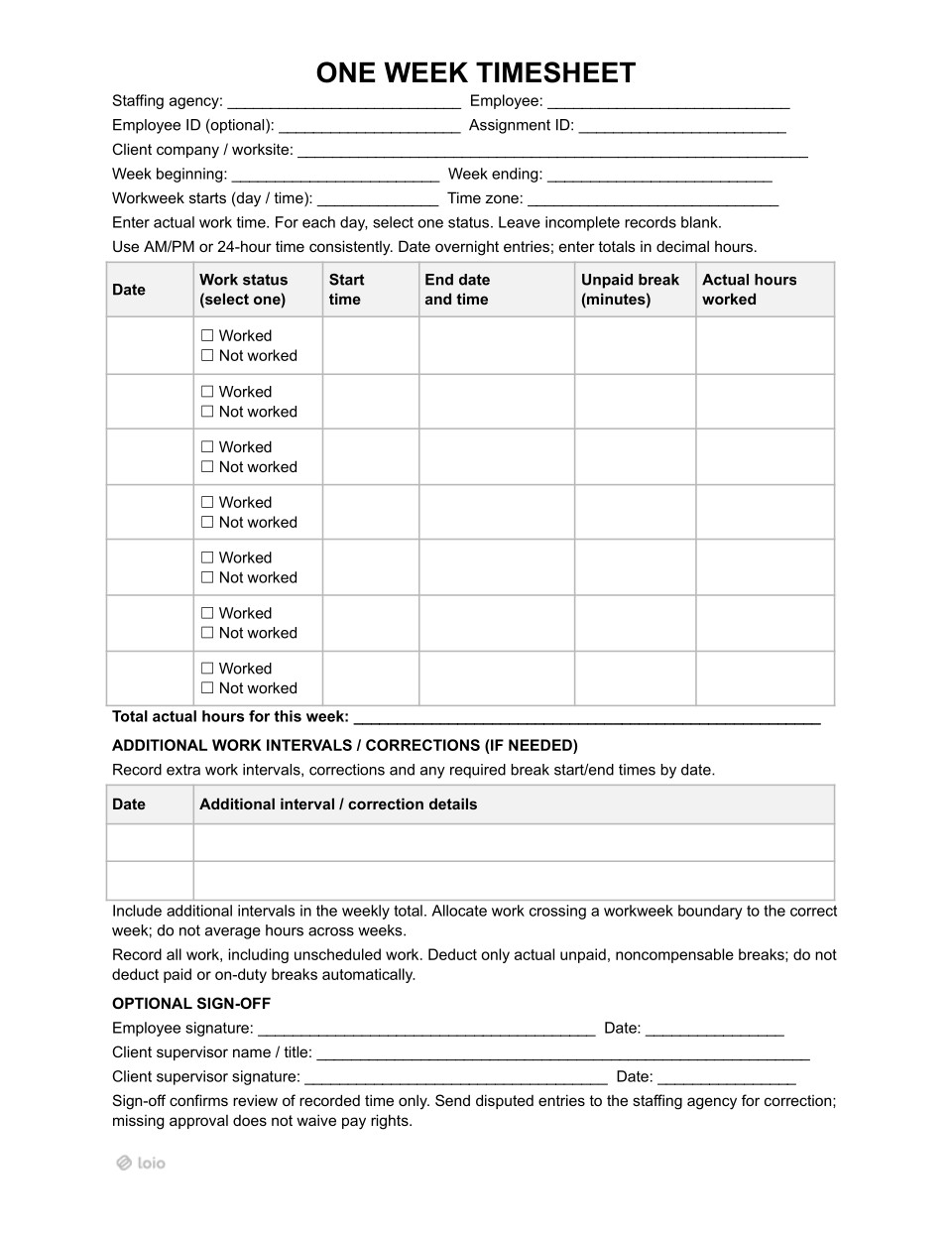
A timesheet template is a form where a worker records the hours they actually worked. It is designed for staffing agencies that place hourly workers with client companies. The worker records the hours, the client’s supervisor reviews them, and the agency uses the same hours to pay the worker and bill the client.
| Staffing agency | Employee | Client supervisor | |
|---|---|---|---|
| What is their role? | Employs and pays the worker | Does the work at the client’s site | Oversees the work on site |
| What do they do with the timesheet? | Prepares it and sets the workweek | Fills in the actual hours | Reviews the recorded time |
| Do they sign? | No, the agency receives the form and pays from it | Yes, first (optional sign-off) | Yes, second (optional sign-off) |
| Do they keep the record? | Yes | No | No |
The client’s signature confirms the hours, not the pay. The agency is the employer: it pays the worker on time and keeps the record, even if the client does not sign.
Is This Timesheet the Right Choice for You?
Copy section linkThe timesheet template fits staffing agencies that employ hourly workers and send them to work for clients. Here are a few situations in which the form can be used:
| Situation | How the timesheet is used |
|---|---|
| A worker packs orders at an online store’s warehouse during the holiday season. The hours change every week. | One timesheet for each week |
| A temporary receptionist replaces an accounting firm’s employee who is on leave for three months. | One timesheet per week, signed by the firm’s office manager |
| A worker spends Monday to Thursday at a hotel laundry and Saturdays at a catering company. Both are clients of the same agency. | One timesheet per client for billing; hours from both are added together for overtime* |
| A nurse aide works night shifts at a nursing home, from 11 p.m. to 7 a.m. | One timesheet per week, with the end date filled in for each night shift |
*Overtime is counted per worker per week, not per client. 32 hours at the hotel laundry plus 12 hours at the catering company equal 44 hours. The worker is owed 4 hours of overtime, even though neither client saw more than 40. In some states, like California, overtime is also counted per day, for hours over 8.
When a different document fits better
- If the agency’s own office staff: a standard employee timesheet template without client and assignment fields.
- If an independent contractor is hired: their hours are set in the contractor’s invoice.
What Should Be Filled In Before the First Week?
Copy section linkThe agency fills in the header before the worker gets the timesheet form. Here’s what the agency fills in and agrees on with the client before the first week:
Workweek
The “Workweek starts (day/time)” field shows the agency’s payroll week, for example, “Monday, 12:00 a.m.” It is not the client’s schedule. Federal rules require employers to record when each worker’s workweek starts. The “Week beginning” and “Week ending” dates follow the same week.
The agency’s payroll week runs Monday to Sunday, and the client’s schedule runs Sunday to Saturday. If the form follows the client’s week, Sunday hours fall into the wrong week, and overtime is counted incorrectly.
Assignment ID and time zone
Assignment ID links the hours to the right client order and rate. It makes billing easier, especially when a worker has two assignments.
A time zone is needed when the agency, the worker, and the worksite are in different time zones, or when a night shift falls on a daylight saving change.
Who signs for the client
Before the assignment starts, the agency and the client agree on:
Who signs as client supervisor (name and job title);
Who signs when the supervisor is away;
The deadline for returning the signed timesheet.
What Should the Agency Check Before Payroll?
Copy section linkThe worker fills in the daily hours, but the agency pays from them. These are the main details to consider:
Totals are written in decimal hours. 7 hours 45 minutes is 7.75, not 7.45. This small error underpays the worker every day. Here’s how to count:
- 15 minutes = .25;
- 30 minutes = .5;
- 45 minutes = .75.
For example, the worker starts at 7:00 a.m., finishes at 3:45 p.m., and takes a 30-minute unpaid lunch. The total is 8.25 hours.
The weekly timesheet records the actual time when work started and ended. If the worker stayed late or came earlier, it is also included. If every day shows the same times, it is worth checking that the data is real.
The break column includes only time when the worker was fully free from work. Under federal rules, short rest breaks (usually 5 to 20 minutes) are paid. A lunch eaten at the workstation while still working is also paid.
A night shift from 11 p.m. to 7 a.m. ends on the next day. The end date should show this, so the hours are counted correctly.
The “not worked” status means no work at all. If the worker came in and was sent home after two hours, the day is “Worked,” with two hours. In some states, such as California, the worker may also be owed “reporting time” pay.
Split shifts, evening call-backs, and corrections go in the “Additional Work Intervals / Corrections” section, each with a date. These hours are added to the weekly total. Corrections are written there, not over the original entry, so the agency and the client see the same history.
A shift that runs past the start of the workweek is split at that point. For instance, if the workweek starts on Monday at 12:00 a.m., and a Sunday night shift runs from 8 p.m. to 4 a.m., four hours go on this week’s timesheet, and four on next week’s.
The Client Supervisor’s Sign-Off: What It Confirms and What It Doesn’t
Copy section linkLet’s picture a situation: a client supervisor refuses to sign a timesheet because Thursday’s 11 hours look too high. Payday is Friday. Should the agency hold the worker’s paycheck until the question is settled?
No. When the supervisor signs, they confirm that they have seen and reviewed the hours; they do not approve the worker’s pay. If the signature box is blank, the hours still count, and the worker still has the right to be paid for them. When disputes over hours arise, the supervisor should send disputed entries to the staffing agency for correction in the “Additional Work Intervals / Corrections” section.
The sign-off matters mainly for billing: signed hours are usually harder to question later, depending on the agency’s agreement with the client. So, the signature helps the agency get paid by the client. It has no effect on whether the agency pays the worker.
How Long Are Timesheets Kept?
Copy section linkThe agency, as the employer, keeps the timesheets for the periods set by the federal and state laws. Typically, they are required to be kept for at least 2 years, but some states may require to keep such records longer. New York, for example, requires payroll records to be kept for 6 years.
The header is updated when the client supervisor changes, the worker moves to another site or time zone, the agency changes its workweek, or the worker gets a second assignment.
How to Prepare, Sign, and Keep a Timesheet with Loio
Copy section linkTimesheets often arrive as photos, forwarded emails, and other formats. Loio keeps the whole process in one place:
Fill out a weekly timesheet template in Loio Templates once per assignment, then update with each week’s hours.
Set the signing order – the worker first, the client supervisor second – and send them signature requests directly in Loio. Once everyone signs, you will receive a notification.
Save the signed timesheet in your account with a record of who signed it and when.
What should a timesheet include?
The employer’s and worker’s names, the dates of the week, the start of the workweek, and for each day: start and end times, unpaid breaks, and hours worked. A staffing agency timesheet also includes the client, the worksite, the assignment, space for corrections, and signatures.
What are the different types of timesheets?
Timesheets differ by period (daily, weekly, every two weeks, or monthly) and by purpose: for a business’s own hourly employees, for staffing agency workers placed with clients, and for project work billed by the hour.
Who signs a timesheet?
Typically, the worker signs first, then the client supervisor. The staffing agency does not sign: it pays the worker from the form and keeps the record.