Free template
Free Vendor Questionnaire Template
Imagine a dental clinic that’s about to hand its computers and scheduling system to a small IT support firm. Before the first invoice, the clinic wants to know who it’s dealing with: the firm’s legal name, its insurance, and whether anyone else will touch the work. The IT firm gets a form called “Vendor Questionnaire” and wonders how much each answer commits it to.
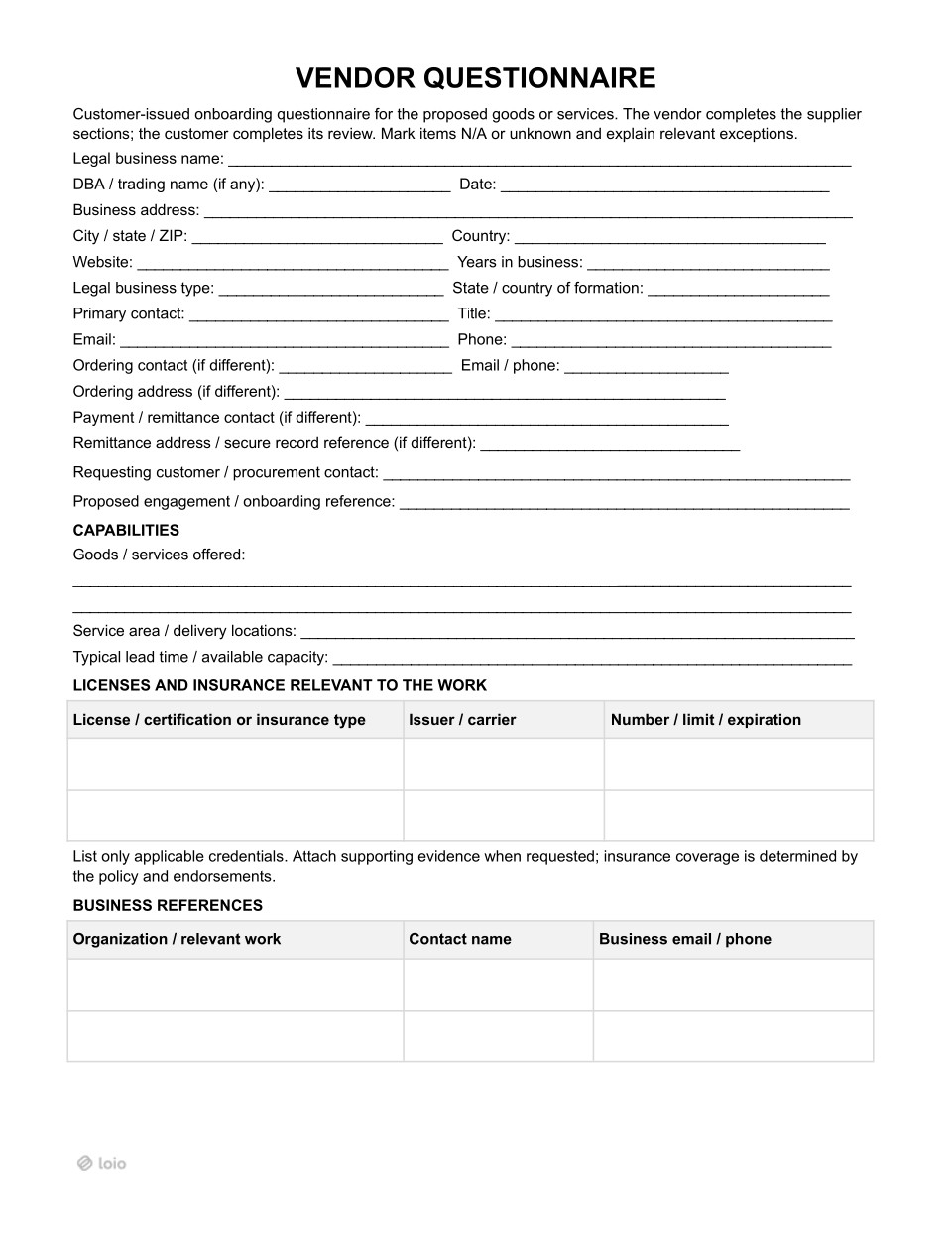
A vendor questionnaire template puts those answers in one place. A customer fills in details on requesting customer/procurement contact and proposed engagement/onboarding reference before sending the form. After that, it sends the document to a vendor. The vendor then fills in everything from the legal business name through the attachments and declaration. Then an authorized person signs the declaration. Once the vendor sends it back, the customer reviews the answers and records the decision, signing it.
One thing to keep in mind on both sides: the questionnaire is a screening record, not the deal itself. The vendor answers only what it can stand behind, and the customer checks what matters to them. Anything that binds either side goes into the contract.
Is a Vendor Questionnaire the Right Step Right Now?
Copy section linkA vendor questionnaire is useful for onboarding-related matters but isn’t a good fit if you need a binding agreement.
Here’s a quick look at different situations and whether the document fits:
| Situation | Does the questionnaire fit? | What else you need |
|---|---|---|
| A first look at a new vendor before the first order | Yes | A purchase order, quote, or agreement once the customer decides to buy |
| The vendor will see customer’s systems or personal or confidential data | Yes, with additions | A security questionnaire and a data agreement |
| Customer needs a deep security or financial check | Only as a first step | A full due diligence review |
| Customer needs firm promises on price, delivery, or liability | No | A vendor agreement, supplier agreement, or service contract |
| Customer needs the vendor’s tax ID | No | A W-9, collected separately |
In this template, “vendor” and “supplier” mean the same party: the business that fills in the supplier sections. Outside this form, the two words aren’t always used the same way. The customer is the business that sends the form.
It’s best to treat this document as a vendor onboarding questionnaire, that is, the first step in the potential business relationship. The ultimate document both sides need depends on their business intent.
When you need a different document
-
The customer buys goods and wants firm terms on price, delivery, and returns: a vendor agreement.
-
The customer will buy from the same supplier again and again: a supplier agreement.
-
The vendor does a defined service job, like repairs, cleaning, or IT support: a service contract.
-
The vendor is a consultant or other professional working on its own terms: a professional services contractor agreement.
“Approved” doesn’t mean “hired”
It’s common to treat the “approved” checkbox as “hired,” but that’s not the case here. The form says it plainly: submission does not guarantee approval or orders. Approval means the customer is comfortable working with this vendor. The order, price, and terms come from a purchase order, a quote, or an agreement. A vendor that buys materials or starts work on approval alone does so at its own risk.
The vendor questionnaire covers one proposed job, which is named in the “Proposed engagement/onboarding reference” field. If the customer later asks the same vendor to do a second job, that’s a new engagement, and some answers may change. When filling in the questionnaire, a vendor should consider how ready it is for the particular case in discussion.
What vendor might be asked to provide
A vendor questionnaire can ask the vendor to provide the following:
Legal business name;
DBA/trading name;
Business address;
Contact information and addresses;
Capabilities (including goods and/or services offered, location, and timing);
Licenses;
References;
Engagement risk and follow-up;
Attachments and declaration.
A café chain with four locations onboards a local bakery. In the questionnaire, the bakery writes that it delivers to every location by 7 a.m. The supply agreement signed a month later says nothing about delivery time and includes an entire-agreement clause. When the bread starts arriving at 9, the café has little to point to.
Outcome: next time, the café copies the delivery window from the questionnaire into the agreement before anyone signs.
What to Have Ready Before You Fill It In
Copy section linkBoth sides should prepare information before filling out the questionnaire. By including only relevant information, the document becomes much more useful for the specific collaboration.
What the customer prepares
Decide what this job really needs before you send the supplier questionnaire. A cleaning company that comes twice a week doesn’t need to prove the same things as an IT firm that will hold your admin passwords. Ask for the insurance and licenses that relate to the work, not everything “just in case.”
What the vendor prepares
Three fields identify the business that will sign the contract and get paid: Legal business name, Legal business type, and State/country of formation. A brand or trading name goes only in “DBA/trading name (if any).”
Vendors should also keep in mind that the legal name must match their W-9. For small vendors, the name on the W-9 form isn’t always the business name:
A sole proprietor puts the owner’s own name on line 1 and the business or DBA name on line 2.
A single-member LLC that the IRS treats as a “disregarded entity” puts the owner’s name on line 1 and the LLC’s name on line 2.
Maria owns Bright Path Cleaning LLC, a single-member LLC. In the questionnaire, she enters “Bright Path Cleaning LLC” as the legal name. Her W-9 shows “Maria Lopez” on line 1 and the LLC on line 2.
Outcome: the customer’s accounts team sees why the two names differ and records the tax ID under the right name from the start.
Moreover, the vendor questionnaire form has separate fields for the ordering contact and the payment/remittance contact because these are often different people. In many small businesses, the owner takes orders and a part-time bookkeeper sends invoices. Filling in both keeps orders and invoices from landing in the wrong inbox.
A mismatch between a vendor’s name and tax ID can accidentally be copied onto a contract — and then, it becomes an expensive mistake. If the IRS flags that a vendor’s name and tax ID don’t match and the vendor doesn’t fix it, the customer has to withhold part of each payment and send it to the IRS. This is called backup withholding, and the current rate is 24%. A mix-up at onboarding can turn into smaller payments months later.
Licenses and Insurance: What Counts as Proof
Copy section linkThe supplier questionnaire template asks you to list only the credentials that apply to this work, with the issuer or carrier and the number, limit, and expiration date. Expiration dates matter most because the customer tracks them after approval.
| Item | What the vendor lists | What actually proves it |
|---|---|---|
| Business or trade license | Type, issuing agency, number, expiration | A copy, or the state or city license lookup |
| Professional certification | Issuing body, number, expiration | The certificate, or the issuer’s online registry |
| General liability insurance | Carrier, limit, expiration | A certificate whose insured name matches the legal business name |
| Additional insured status | “Customer added as additional insured” | The endorsement, not the certificate |
| Workers’ compensation | Carrier, policy period | A certificate, or a short note on why it’s unknown |
The name on the certificate
When filling in (or evaluating) the certificate field, both the customer and a vendor should check whether the insured name on the certificate matches the vendor’s legal business name. The vendor may have changed the business name or have different certificates for different companies. And so, if the name on the liability policy on a certificate isn’t the same as the vendor’s name on a questionnaire (and a contract later on), it won’t cover the vendor’s business that signs the contract. Doing a double-check protects both parties.
An HVAC company signs as Northside Heating LLC, but its liability policy is still in the name of the owner’s old company, Northside Mechanical Inc.
Outcome: the customer spots the mismatch, and the vendor asks its broker to fix the policy before it resubmits the form.
Certificate doesn’t mean coverage
Coverage is determined solely by the insurance policy and its endorsements, not by a certificate of insurance (such as the ACORD 25 form). A certificate is merely a summary and does not grant any legal rights to the holder.
If a client requires protection under a vendor’s insurance, they must be added directly to the policy as an "additional insured" through a written endorsement. This is common under a subcontractor agreement; for example, a plumbing subcontractor working for a general contractor is usually required to name the general contractor as an additional insured. Before confirming coverage, the subcontractor should verify with their broker that the proper endorsement is active and matches the policy terms.
One more check: the limits asked for in the questionnaire and the limits required in the contract should be the same. If the form asks for $1 million and the contract later asks for $2 million, the customer has approved a vendor on coverage that doesn’t meet its own terms.
Subcontractors, Data access, and Disputes: Answering the Risk Questions
Copy section linkThe Engagement risk and follow-up section has three “Yes / No / Unknown” questions. They decide how much follow-up the customer needs. Any Yes or Unknown needs a short explanation in “For Yes / Unknown: scope, safeguards and evidence references.”
Why “No” isn’t the safe answer
“No” isn’t necessarily a safe option. If a vendor ticks “No” and later brings in a subcontractor or gives its staff access to the customer’s systems, the record is wrong. The customer then has a reason to doubt every other answer on the form. Until the plan is settled, “Unknown” with a short explanation is the honest answer.
| Answer | What it means | What happens next |
|---|---|---|
| Yes | It will happen on this job | Vendor must describe the scope and safeguards; the customer may ask for more |
| No | It won’t happen | Nothing now; vendor should tell the customer if it changes |
| Unknown | Not decided or confirmed yet | Vendor must explain what it depends on and update the answer once settled |
A “Yes” on data access is where this form hands off to other documents. The questionnaire records that the vendor will see customer systems or personal data. It doesn’t cover how that data is protected. A separate security questionnaire covers the controls, and a data agreement covers the obligations.
Staffing agencies are a prime example of where this context often gets tricky. A staffing agency is a vendor whose primary service is supplying human talent to the customer. When completing the questionnaire, the agency must account for the access level of the workers it places with the customer, not just its own internal back-office staff. If those placed workers will touch customer systems, the agency must answer “Yes” to system access. As a result, the customer knows a data agreement must sit next to the staffing agency services contract.
Disputes and backup plans
The disputes question covers anything that could affect the work: an open dispute with a client over similar work, or a restriction like a non-compete with one of the customer’s competitors. If there’s nothing, vendors pick “No.” If they’re checking, they choose “Unknown” and explain why.
The “Service continuity/substitute capacity/recovery arrangements” field asks what happens if the key person or site is unavailable. A short, real answer works better than a general promise. “If our lead technician is out, our second certified technician covers, and we respond within 48 hours” tells the customer something. “We have strong continuity plans” keeps things vague.
Want to know if the dispute and backup subjects are covered sufficiently? Use AI summary to analyze the document and pinpoint red flags.
Payment Details: Why Bank Information Stays Off the Form
Copy section linkThe vendor questionnaire template asks only for a “Remittance address / secure record reference” but doesn’t ask for bank details directly. It simply says to collect W-9s, tax IDs, and banking details separately through a secure process. The reasons behind it are simple:
Dangerous data exposure. A questionnaire travels by email, gets forwarded, and sits in several inboxes and shared folders. Account numbers don’t belong in a file like that.
Fraud threat. A common fraud works through a fake email that looks like it came from the vendor: “We’ve changed banks, please update our details.” Nacha's Business Email Compromise Action Plan advises confirming any change to payment details outside the channel that asked for it. That means a call to a number you already have on file, not one from the email.
One rule for payment changes
A customer can set this rule once and use it for every vendor:
-
Collect bank details one time, through a secure channel, never in the questionnaire.
-
Treat every change request as unconfirmed, however familiar the sender looks.
-
Call the vendor at the number on file and speak to a contact you know.
-
Update payment records only after the call, and note who confirmed the change and when.
What Signatures on Both Sides Mean
Copy section linkThe vendor’s signer confirms two things: that they’re authorized to submit the questionnaire for the vendor, and that the information is accurate to the best of their knowledge. The signer should be someone who can speak for the business, like the owner, an officer, or a manager, not whoever happened to receive the email. By signing, the vendor also promises to report material changes.
Three potential outcomes
The Customer review only section gives three outcomes:
Approved: the customer is comfortable working with this vendor. No order has been placed yet.
Follow-up required: something is still missing, like an endorsement, a license copy, or a data agreement. Write exactly what in “Conditions / outstanding evidence / specialist review reference.” This is often the right result, because it records what’s open instead of approving on trust.
Not approved: the customer won’t move forward with this vendor for this job.
Some checks belong to the customer alone and happen outside the form. One of them is sanctions screening. A US business that deals with a sanctioned person or company can face civil penalties from OFAC, the Treasury office that runs these sanctions, even if it didn’t know (OFAC FAQ 12). Search the vendor’s legal name in OFAC’s Sanctions List Search, then record the search reference in the Conditions field.
When to revisit the questionnaire
An approved questionnaire doesn’t stay accurate forever. Revisit it when:
The scope of work or the locations change
The vendor brings in a new subcontractor
The vendor gets access to systems or data it didn’t have before
A license or insurance policy is about to expire
The vendor’s ownership changes
The vendor’s remittance details change
How to Send and Sign the Vendor Questionnaire in Loio
Copy section linkThis is how a vendor questionnaire usually goes: a PDF or Word file travels back and forth by email, gets filled in by hand, and comes back as a signed scan. The attachments arrive in separate threads. A year later, when an insurance policy expires, nobody can find the final version. With Loio, the process of filling in the questionnaire and storing it is pretty straightforward:
Save and customize the form
A customer opens the vendor questionnaire template in Loio and, if needed, customizes the PDF by adding other questions or details such as a brand logo. Then, the customer saves it in their account.
Send it for signature
A customer sends the form to a vendor by email with a signature request. After that, the vendor fills in all the information and provides the signature. It then goes back to the customer, who records and signs the decision. Both signatures sit on one document, with a time-stamped record of who signed and when.
Keep it and reuse it
If you onboard vendors often, you can save the customized template in your account and send it to each new vendor. It saves time and helps you connect with potential vendors faster without repeating the same edits for a document.
What is a vendor questionnaire?
It is a structured written assessment that a buyer sends to a third-party supplier, vendor, or service provider before onboarding them or granting access to company data, systems, or infrastructure. It does standard due diligence, collects crucial self-disclosed claims, and helps a customer make an informed decision.
What questions should you ask a vendor?
Ask what this job needs, not everything you can think of. Most customers start with the vendor’s legal identity, what it offers and where, the licenses and insurance tied to the work, two references, and whether subcontractors or data access are involved. The vendor questionnaire template covers each of these in its own section.
What is a vendor assessment?
A vendor assessment is a customer’s ongoing review of a vendor: its risks, its performance, and whether it still fits. The signed questionnaire is usually the first input. Later checks, like insurance renewals or a change in data access, build on it.
What is a vendor due diligence questionnaire?
A vendor due diligence questionnaire is a detailed form a customer uses to inspect a vendor’s security, finances, and business practices before working together. The questionnaire digs into specific evidence, asking for proof like security audits, insurance policies, and financial statements. It is triggered when a vendor will handle sensitive data, critical systems, or high-value contracts.