Free template
Free Change Request Form Template
The client wants two extra website features. They're outside the original deal. Who pays, and does the deadline move? Our change request form template helps both sides settle those questions before work starts.
Describe the proposed work, assess the costs and timing, and record a decision both sides can rely on.
What Is a Change Request Form?
Copy section linkA change request form records a proposed change to an ongoing project or retainer, the impact on scope, price, and schedule, and the decision of the authorized parties. Either the client or provider can initiate it.
An email requesting extra work doesn't automatically authorize it. This form records the proposed price, schedule changes, and approval by the authorized parties.
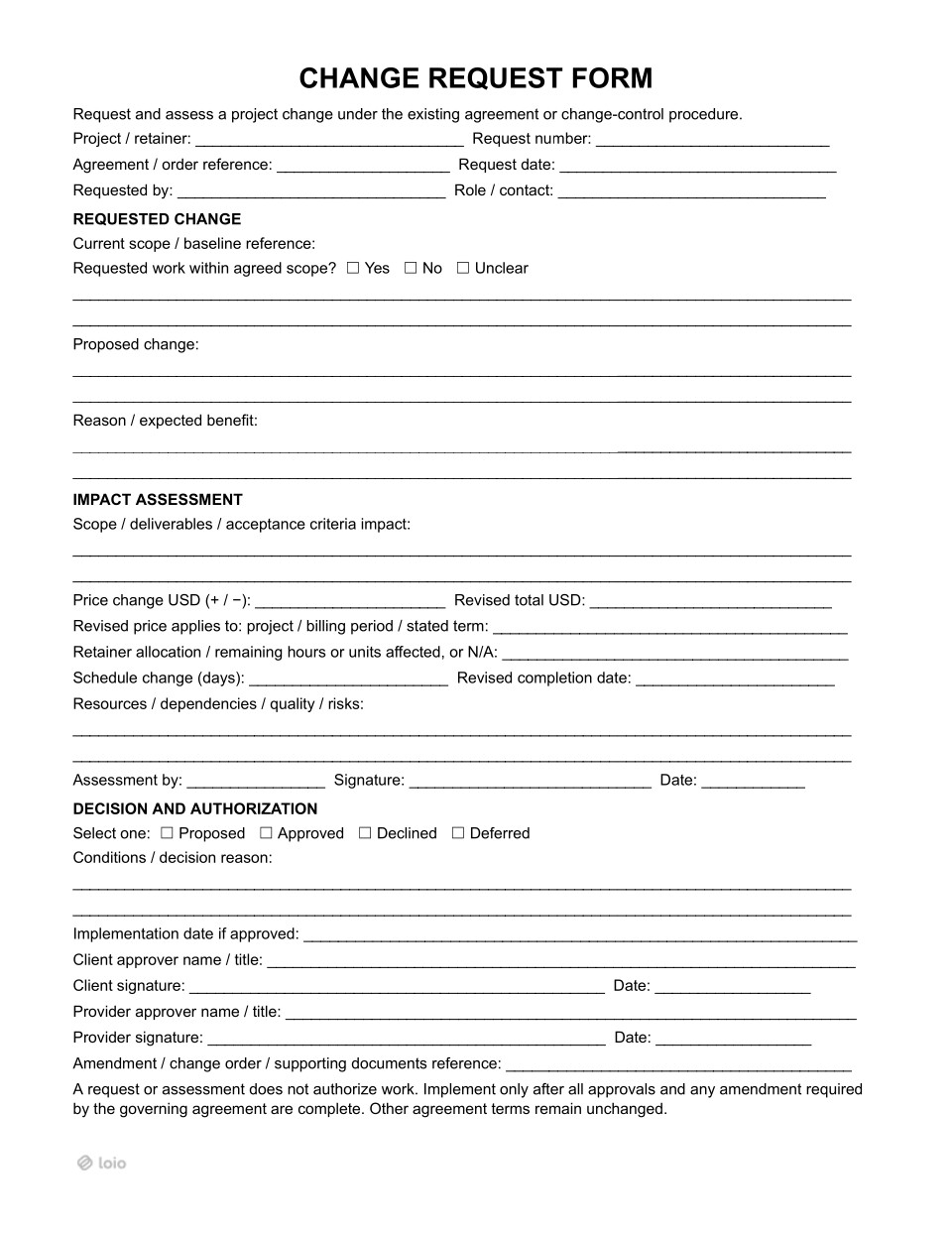
Start with the PDF's question: “Requested work within agreed scope?”
Yes: If the task is already promised under the existing agreement, no change is needed to perform it.
No: Prepare a request describing the added, removed, or revised obligations.
Unclear: Agree on the original scope first. Don't price something as “extra” when neither side knows what the contract already covers.
What are examples of change requests?
Add work: A web agency is asked to build a dashboard not included in its Statement of Work (SOW).
Reduce work: A client removes two scheduled marketing deliverables and requests a price credit.
Move a deadline: Late client-supplied materials push installation back by one week.
Change a retainer: A client increases the monthly service hours or changes how an existing hour bank is allocated.
Is this form enough to change the contract?
Not always. A change request template supports assessment and approval; it doesn't replace a separate amendment or change order required by the governing agreement. Depending on the contract and applicable law, an email exchange may sometimes evidence an agreed modification — but a request alone proves no such agreement. Enter any required supporting document under Amendment / change order / supporting documents reference. See Addendum vs. Amendment.
This form suits many private service, project, and retainer arrangements. If there's no existing deal, establish the work first using a Service Contract or Statement of Work.
Business and Professions Code § 7159(c)(5) and (d) require applicable change orders to be written and signed before the changed work begins. Section 7159.6(a) identifies the scope, amount added or subtracted, and effect on progress payments or completion date. This generic form may need additional disclosures or payment details. Use an appropriate Construction Change Order; projects using AIA (American Institute of Architects) documents may call for AIA G701.
Under FAR 43.102(a), only an authorized contracting officer can execute a modification for the government. Follow the agency's modification process instead of relying on a program contact's signature.
What to Check Before Requesting a Change
Copy section linkBefore completing the request for change form, open the signed agreement and find its change-control clause. Check who may approve changes, any spending limits, the required form, and deadlines or notice rules.
Locate the current SOW, deliverable list, and acceptance criteria. Enter an exact Current scope / baseline reference, such as “SOW § 3.2, signed June 1.” Without a written baseline, select Unclear and settle that baseline before quoting a new fee.
Find the latest approved total. If an $8,000 project already has an approved $400 addition, its current baseline is $8,400. Keep prior changes identifiable by Request number.
How to Create and Fill Out a Change Request Form
Copy section linkThis request for change form template takes the proposal from identification to authorization in five steps.
Step 1. Identify the project and requester
Fill in Project / retainer, Request number, Agreement / order reference, and Request date. Enter the requester under Requested by and Role / contact. Use sequential IDs such as CR-001 and CR-002 to trace changes over time.
Step 2. Describe the proposed change
Identify the existing scope, check Yes, No, or Unclear, and complete Proposed change and Reason / expected benefit.
For example:
“Add a dashboard with CSV export to SOW § 3.2. The signed scope covers a reporting page, not a downloadable dashboard.”
Both parties can evaluate that.
Step 3. Assess scope, price, and schedule
Start with Scope / deliverables / acceptance criteria impact. Say what the revised deliverable includes and how the client will accept it. Then complete the impact fields:
| PDF field | What to record |
|---|---|
| Price change USD (+ / −) | Increase or credit, with its sign |
| Revised total USD | Latest approved total plus or minus this change |
| Revised price applies to | Project, billing period, or stated term; clarify when the new price takes effect |
| Retainer allocation / remaining hours or units affected | Hours or units added, used, or remaining; otherwise N/A |
| Schedule change (days) / Revised completion date | Consistent day adjustment and date |
| Resources / dependencies / quality / risks | Staffing, missing inputs, tests, or possible delays |
Example: Our website project starts at an approved $8,400. The dashboard adds $900, bringing the revised total to $9,300. It needs five extra working days and CSV-export acceptance testing. Record all three, not just “dashboard + $900.”
For a retainer, a move from $1,200 to $1,400 per month means +$200 each billing period, not a one-time fee. Specify the applicable period. Here, retainer includes recurring engagements and banks of hours or units, not only a lawyer's advance deposit.
A higher fee for unchanged duties can raise common-law consideration issues; fair modifications due to unanticipated circumstances may be treated differently (Restatement (Second) of Contracts § 89). For goods, UCC § 2-209(1) generally allows good-faith modifications without new consideration. Explain what changed rather than relying on a new number alone.
Step 4. Assess the request and record the decision
The reviewer completes Assessment by, signs, and dates the impact assessment.
Select Proposed, Approved, Declined, or Deferred. Explain the outcome in Conditions / decision reason. A short condition — “Approved if delivered with release 2” — may turn an initial “no” into an agreement with limits. For a deferral, record the date or event that triggers another review.
Step 5. Confirm approvals and an implementation date
Complete Client approver name / title and Provider approver name / title, with the corresponding signature fields. Enter Implementation date if approved and any amendment or change-order reference. The form states that all other agreement terms remain unchanged. See the signing requirements below.
Who Needs to Sign a Change Request?
Copy section linkThe project change request form provides three different signature fields:
Assessment by: The estimator or project lead signs to confirm the impact was reviewed; that isn't approval.
Client signature: The client's authorized approver accepts the revised terms.
Provider signature: The provider's authorized approver accepts the conditions, price, and delivery obligations.
For an approved change, both client and provider approvers should sign this form, and may also need to sign a separate amendment. In Client approver name / title, name an authorized decision-maker, not merely the requester. Check the original contract for named approvers and spending thresholds.
Submit changes to the party that contracted with you, usually the general contractor, under the Subcontractor Agreement. An owner's employee approving extra work doesn't automatically amend your subcontract.
Changing representation scope or fees may require an updated engagement or Fee Agreement. ABA Model Rule 1.5(b) addresses communication of fee-basis or rate changes; state rules may impose further requirements. The client's signature creates a record of the change discussed and accepted, but doesn't necessarily replace an updated engagement or fee agreement.
What Happens After the Decision?
Copy section linkWhere the agreement or applicable law requires advance written authorization, unapproved work may fall outside the agreed contract price. The provider could face a disputed payment claim instead of an ordinary invoice claim. In California home improvement cases, § 7159.6(c) leaves room for legal or equitable remedies against unjust enrichment, but recovery is not assured.
The client also faces risk: repeatedly accepting or paying for unapproved changes may support an argument that the parties waived their “changes in writing” procedure. That depends on applicable law and does not erase statutory writing requirements.
A Declined request means the original approved scope continues. A Deferred request stays on hold until its stated review date or event. A Proposed request is still awaiting a decision.
After approval, update the SOW, milestones, acceptance checklist, and billing records. Invoice under the new price for its agreed effective period. Keep the approved form alongside the underlying agreement and any amendment. Number each new request instead of editing a signed record. If only the contract term needs extending, consider a Contract Extension Agreement.
Create and Sign Your Change Request With Loio
Copy section linkAn emailed PDF invites version trouble: the client changes a price in one copy, the provider agrees to another, and nobody is sure what got signed. With Loio's PDF tools, edit the working document and redline a disputed figure or condition with markup or strikeouts. Review the proposed edit with the other party, then finalize one version for signature; redlines don't themselves mean the change was accepted.
Use Request eSignatures to collect all three signatures when needed: the assessor first, the provider approver next, and the client approver last. The client then signs the terms the provider has accepted. Track progress and send reminders. The timestamped audit trail shows when the last signature was added, helping you check whether approval was completed before the Implementation date; confirm any separately required amendment too.
The signed copy stays in your Loio account. For frequently changing projects, reuse the signature request as a template for new requests with the same recipients and signing order, updating the scope, figures, dates, and request number each time.
Why You Should Trust This Template
Copy section linkThis project change request form addresses disputed scope, surprise costs, missed deadlines, and unauthorized approval. Its separate assessment and authorization fields make the decision easier to audit. The guidance follows the PDF and cites US law on construction changes and attorney fees.
Disclaimer: This is a general US form, not a guarantee of enforceability or compliance in every state or industry. The governing agreement, applicable law, and any required amendment or industry-specific change order control. Seek legal advice for high-value or regulated changes.
Related Documents
Also Read